

This week brings powerful REST API connections, a completely redesigned connections interface, time editing in date cells, and comprehensive UI improvements across all analysis sidebars.
Features
REST API connections
Connect directly to external REST APIs as data sources. The new API connection supports multiple response formats (JSON, GeoJSON, CSV, NDJSON), various authentication methods, pagination strategies, and template variables for batch processing. A multi-step wizard guides you through configuring your API endpoint, making it easy to bring external data into Atlas.
Redesigned connections interface
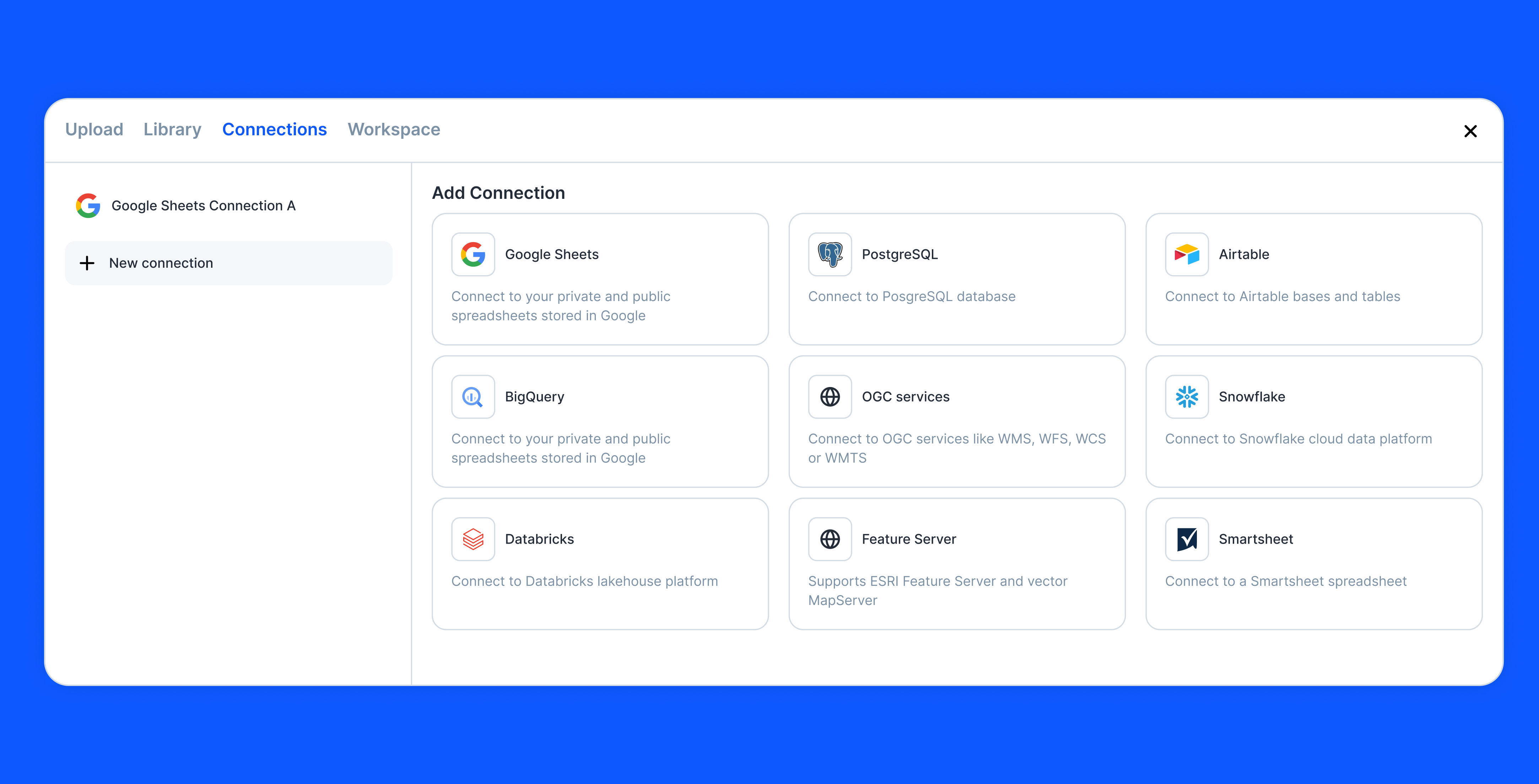
The database connections interface has been completely redesigned with a new sidebar-based layout. Browse connection types in a clean grid view, configure connections in a dedicated form panel, and enjoy consistent styling across all connection forms. The new design makes it easier to set up and manage your data connections.
Time input in date cells
Date columns now support inline time editing. When time is enabled for a date column, a time input appears in the date picker popover, making it simple to edit both date and time without leaving the data table.
Tabbed icon picker
The icon picker now organizes icons into separate tabs for Symbols and Custom icons. This makes it easier to find the icon you need and keeps the upload functionality clearly separated in the Custom tab.
Navi message formatting
Format your messages to Navi with bullet points and line breaks. Press Shift+Enter for a new line, start a line with a dash for a bullet point, and your formatted text displays beautifully in the conversation.
Consistent dataset icons
Dataset icons are now consistent across the entire application. Whether you're in the layer panel, dataset selector, or connection settings, you'll see the same visual indicators for points, lines, polygons, and tables—making it easier to identify datasets at a glance.
"Last used" badge on login
The login page now shows a "Last used" badge on whichever authentication method you used last time. This helps you quickly identify how you signed in previously, whether that's email or Google.
Fixes and Improvements
- Improved all operation sidebars with better spacing, consistent styling, and cleaner layouts
- Fixed keyboard shortcuts being disabled when data table is visible but not being edited
- Fixed workflow edge connections not saving on first edit
- Fixed drawing on layers when a feature is selected
- Fixed color picker popover not displaying inside modals
- Fixed breadcrumbs on collections not updating when navigating folders
- Fixed missing distance data on elevation profile tool
- Added Unix timestamp preview formatting when selecting date columns during CSV upload
- Fixed legend graphics in Map Export and improved "exclude outside map extent" toggle
- Fixed image and PDF filtering to use "has file" and "is empty" instead of text matching
- Fixed mask filter slider not syncing with max value input
- Fixed syntax highlighting of "!=" operator in formulas
- Fixed related dataset cache invalidation when deleting columns
- Layer styling now supports single/multi-select options defined in column metadata
- Improved differentiation between single and multi user field filtering
- Cleaned up form block settings layout
- Fixed infinite re-render of datatable in widget
- Fixed loader display in background tasks
- Added missing taxi icon to map symbols
- Fixed dissolve quick action using correct endpoint
- Cleaned up webhook trigger configuration styling
- Improved data table total count display



