

This week brings Airtable integration, powerful geocoding features, a dedicated location search widget, and significant improvements to mobile experience, marker performance, and multi-select filtering.
Features
Airtable connection
Connect your Airtable bases directly to Atlas. Import and sync your Airtable data to visualize it on maps, run spatial analysis, and build interactive interfaces—all while keeping your data synchronized with Airtable.
Geocoding and re-geocoding
Transform addresses into map coordinates with the new geocoding functionality. Geocode your data when importing, or re-geocode existing datasets when addresses change. This makes it easier than ever to get your tabular data onto the map.
Search Location widget
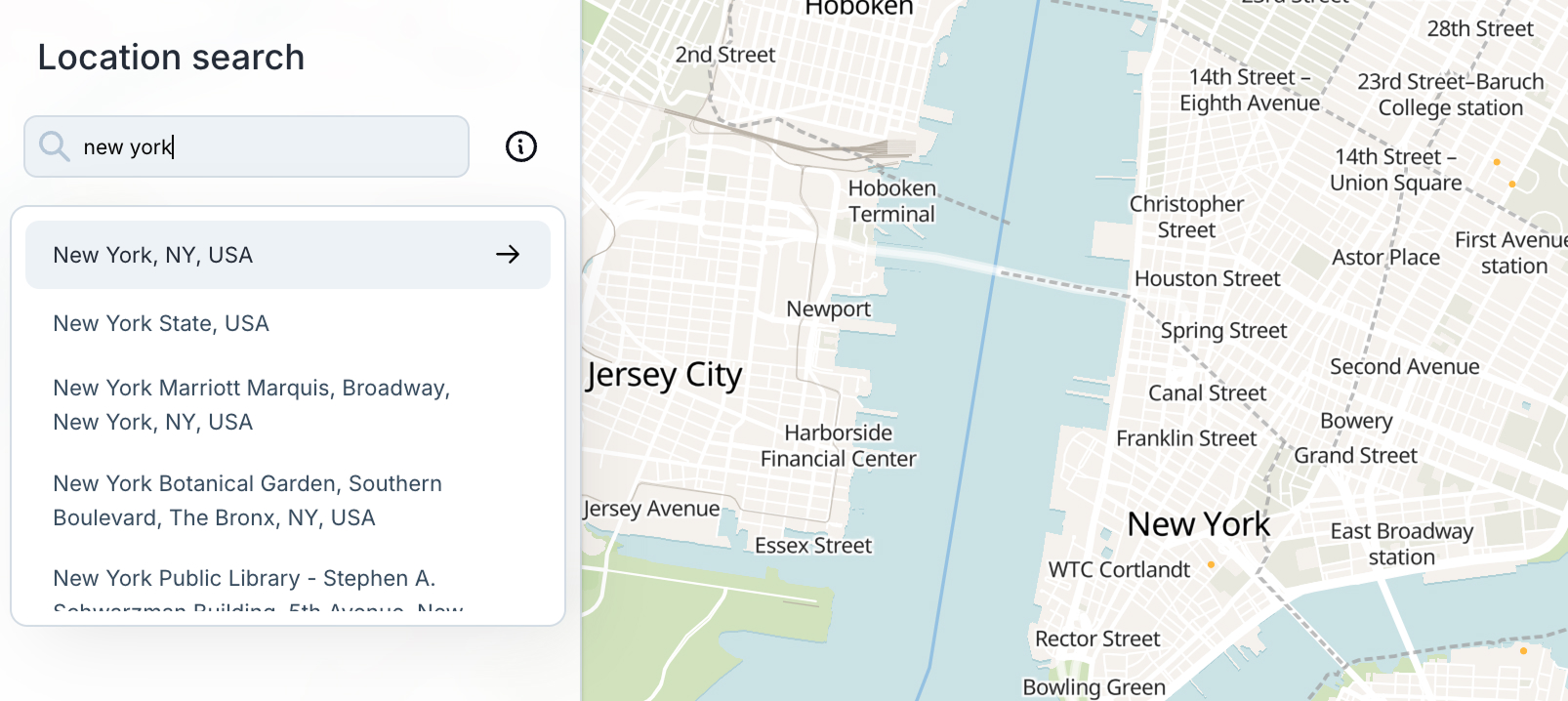
A new dedicated widget for prominent location search within your interfaces. Place it anywhere in your widget layout to give users easy access to location search. The search results display in a floating dropdown, so it works seamlessly alongside other widgets in your sections.
Account email management
You can now change your email address directly from your account settings. This was a frequently requested feature—update your email without needing to contact support.
Profile picture management
Added the ability to remove your profile picture and workspace avatars. A new dropdown menu on avatars lets you upload a new photo or remove the current one.
Improved multi-select filters
Filtering on multi-select columns now uses proper array-based matching instead of text containment. Filter values display as styled pills that match your column's color scheme, making it easier to see exactly what you're filtering by.
Desktop popup editing
Re-enabled the ability to edit popup field values directly on desktop. A global "Enable editing" toggle in the popup configuration panel lets you control whether users can modify field values through the popup interface.
Mobile interface overhaul
Major improvements to mobile interfaces as part of our effort to unify mobile and desktop experiences. Removed the legacy mobile panel in favor of a cleaner, more consistent approach. Data tables now work on mobile, and overall mobile usability is significantly improved.
Fixes and Improvements
- Improved marker layer performance by rendering minimized markers as a GL layer instead of DOM elements
- Markers now update in real-time while moving the map
- Lasso selection now works with minimized markers
- Column names display bold in filter expression text for better readability
- Added loading states when creating or opening projects
- Fixed column headers not updating when syncing Google Sheets connections
- Improved comments design with cleaner layout and better mobile support
- Fixed formula field cursor jumping to end while typing
- Users can now hide the Intercom chat bubble
- Added delete button to widget settings sidebar
- Fixed undo/redo while editing and lasso-select issues
- Fixed panning to relations and arc layer for related features
- Fixed date picker cells falling behind the right sidepanel
- Fixed navigation toolbar scaling on smaller screens
- Fixed select-field color display
- Fixed deleted projects staying in project list
- Improved histogram widget settings styling
- Custom date formatting in data table cells
- Fixed slider label overflow in timeline widgets
- Preserved drawer open/close state when selecting workflow nodes
- Fixed bounds selector going outside screen boundaries
- Auto-create blank interface when switching modes if missing
- Validation for timeline and filter widgets when connected datasets are deleted
- Fixed button colors for all disabled variants
- Fixed keyboard shortcut conflicts with browser navigation
- Increased travel time analysis range



